Remote Control
Remote Control is a web interface dedicated to assist a Skyreal VR user in its operations. You can remotely start commands and change selection.
Requirements
Remote Control is a web app which requires Node.js to run.
- Download and install latest LTS Node.js version here.
Then, you must allow Remote Control in the Skyreal VR settings.

Launch
Inside the Skyreal VR\Skyreal VR\Content\Scripts directory, open CMD and start the server:
node index.js
Now you can reach Remote Control on your web browser at 127.0.0.1:3000.
Note that Skyreal VR must be started in collaborative mode.
Interface
Commands
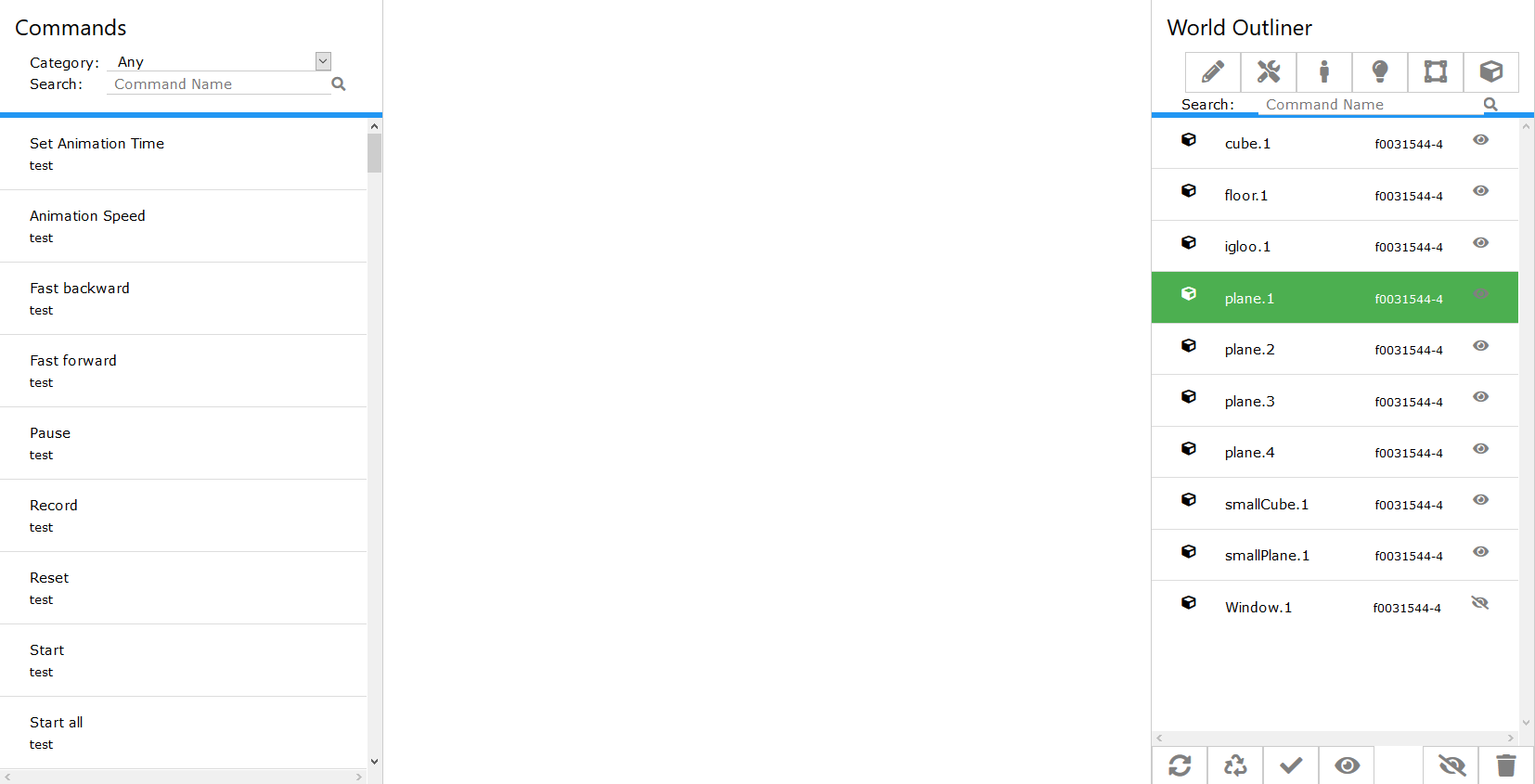
The left panel lists all the available commands.
Some commands need a selection. They will take into account your selection in the world outliner.
World outliner
The right panel lists all the object of the scene. You can sort them by type using the filters.

There is a distinction between the selection of the Skyreal VR user and the selection of the Remote Control user.
- Skyreal VR selection is represented by a red border:

- Remote Control selection is represented by a green tile:

At the bottom, a toolbar lets you:

- Refresh the interface to see the current selection of the Skyreal VR user
- Clean the Skyreal VR user's selection
- Apply your selection to the Skyreal VR user's one
- Focus on the Skyreal VR user's selection in the World Outliner
- Hide the selected parts (your selection)
- Remove the selected parts (your selection)