Advanced Physics
Our Advanced Physics module is based on XDE Physics, the interactive multi-physics simulation engine designed by CEA List (Laboratory for Integration of Systems and Technology), stemming from 20 years of CEA research in the nuclear field.
Integrated into SKYREAL's immersive solutions, it delivers an unparalleled level of realism in virtual and extended reality.
By combining the power of Unreal Engine and SKYREAL, the Advanced Physics module meets the demands of high-precision physical simulations for complex industrial projects.
Getting started
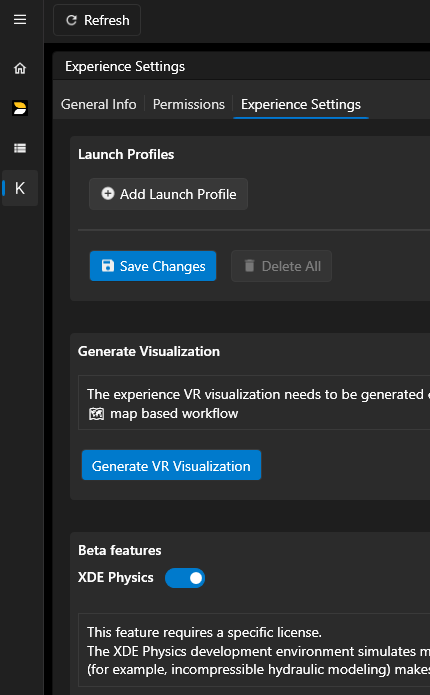
To benefit from XDE physics engine, your company must aquire specific licenses for this product. Then you must activate the license for your experience in the experience settings > Beta features:
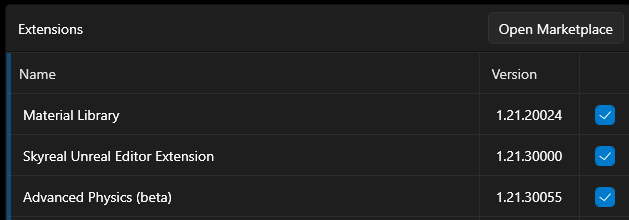
Finally, to enable all the XDE features, you need to add the "Advanced Physics (beta)" extension from the Marketplace.
Setup physics
All the setup of Physics properties, groups, constraints, cables, ... is done from the XDE Workbench command.
Workflow
Here is a common workflow from openning Skyreal to playing physics in VR.
- Open Skyreal
- Execute XDE Workbench command to physicalize parts, create groups, constraints and cables and edit their properties.
- Quit XDE Workbench
- Save your work. Physics simulation is still unstable, thus, the initial state and the current physics setup must be saved before you start physics.
- Start physics
- First, use "Show collision" command if you want to display the collision arrows. It can't be changed while physics is started.
- Then, Enable gravity if needed using "Toggle gravity" command. (it can be changed during physics simulation)
- Finally, Start Physics using "Toggle physic" command.
- Go to VR
When you decide to stop physics, you might encounter a crash.
Also, restarting physics might bring side effects.
It is highly recommended so far to restart SkyrealVR to test a new physics configuration.
This will be fixed for release 1.22.
Manipulate
During physics simulation, the manipulation of parts can be done with any of the default grab methods.
Each grab method has a Custom parameter to choose if a freezed part must be re-freezed immedialty when the user stops grabbing, or at the exit of the grab command. We suggest to enable that option for Physics manipulation.
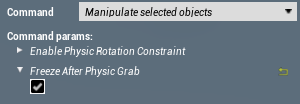
A specific command called "Physics grab" exists for specific use cases. It is functionnal but not meaningful compared to other standard grab commands.
Known issues / Limitations
- Skyreal might crash randomly after stop physics. -> must save before you start physics, and restart SkyrealVR after stop.
- Cables are not working after restart physics. -> must restart SkyrealVR
- Groups selection issue from XDE workbench. -> to edit group properties, select the group from the viewport, not from the tree.